
Steps to Add an Account Number to a Vendor Profile:
1. Go to Lists > Vendors
2. Select the vendor you will be adding the account number

3. Open the Purchasing Tab

4. Enter in the account number under “Account”
- If you have a multi-store location, you will want to add in any additional account numbers by selecting “Additional Account Numbers” and selecting the store number that it is associated to.
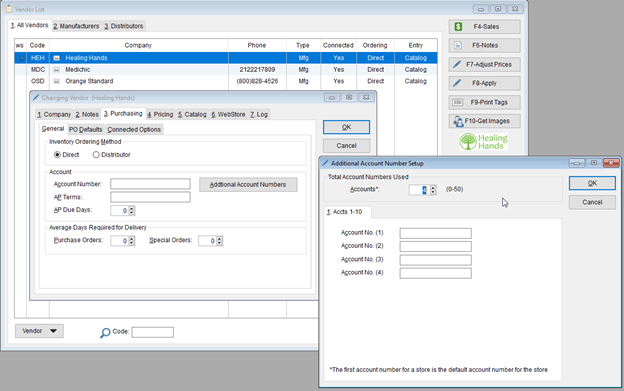
5. Select “OK” to save the account number.
Note: If you are wanting to EDI purchase orders to vendors that we are partnered with – you will want to reach out to your account representative and tell them to turn on the capability to do so. You can visit our partnership page to see which vendors have the ability to receive orders by EDI.
📌 Need more help? Visit our Training & Onboarding site, explore the Knowledgebase, or submit a ticket.