
💳 MerchantTrack Portal
Overview
MerchantTrack is the web-based portal used to manage, monitor, and report on payment activity for UniformPay. This guide provides an overview of how to access the portal and the key features it offers.
🔐 Accessing MerchantTrack
To open the MerchantTrack Portal directly from The Uniform Solution (TUS):
-
Go to Home > Payment (dropdown) > UniformPay Merchant Portal
✅ Note: Single Sign-On (SSO) must be enabled in your system settings for direct access – For step-by-step instructions, check out: UniformPay System and User Permissions Setup Guide

📊 MerchantTrack Features
1. Dashboard Overview
The dashboard is divided into three main sections:
-
Shortcuts
-
Quick links to:
-
Recent Transactions
-
Recent Funding Activity
(Default time frame: last 7 days)
-
-
-
Stats
-
At-a-glance totals for:
-
Transaction count
-
Transaction volume
-
Last processed transaction (clickable for quick access)
-
-
-
Visualization Tool
-
Graphical display of daily transaction volume for the selected store
-

2. Transaction Search
Quickly locate specific payments using fast and customizable filters.

Viewing Transaction Details
- On the Transaction Search page, choose the merchant/location, if assigned more than one.
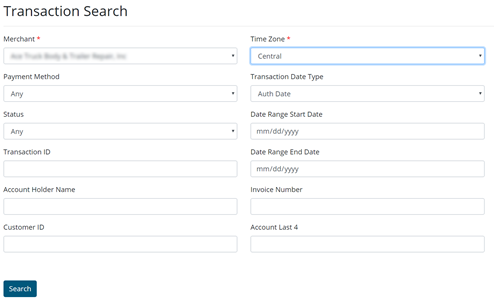
- The merchant may also narrow the criteria by filling any other field and click Search.|
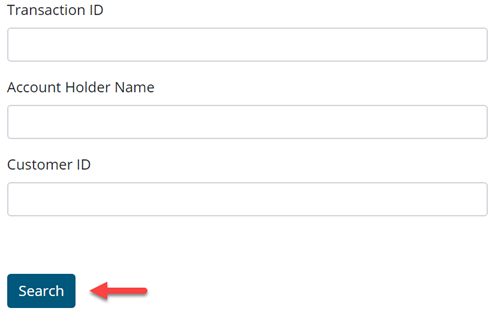
Please note: if no search criteria are selected except the merchant/location, the system will pull every transaction that has ever been processed through Fullsteam.
- On the next page, the merchant may view the transaction details by clicking on the blue transaction ID.

The merchant may view the status of the transaction (Batched/Voided/Refunded), the cardholder information, the approval or reason for decline here.
- On the transaction details page, the merchant may also see the option to view a receipt or refund a transaction.

3. Virtual Terminal
A standalone manual entry form for processing payments when The Uniform Solution is unavailable.
⚠️ Important:
The Virtual Terminal is not integrated with TUS and should only be used in emergencies or when access to TUS is temporarily unavailable.

There are several required fields that must be filled out to complete a payment.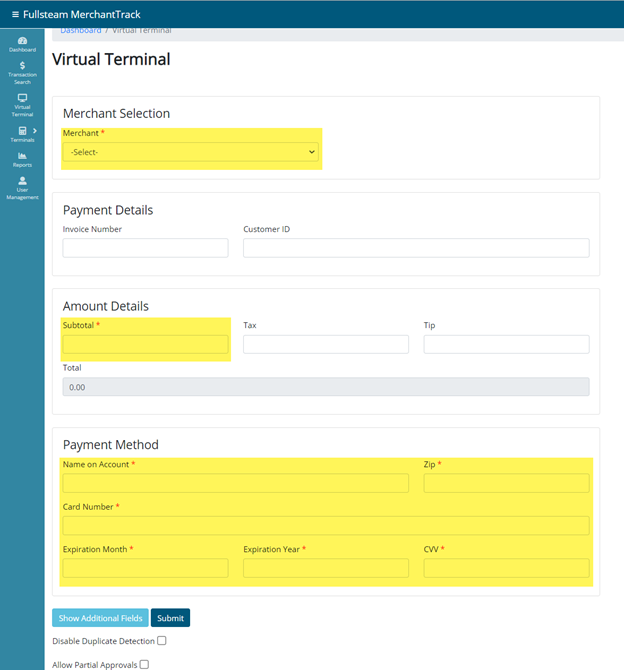
There are two different options that can affect the way the transaction processes.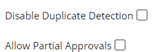
-
- Disable Duplicate Detection
- Enables the merchant to process two or more of the same amounts on the same card within 25 transactions of each other.
- Allow Partial Approvals
- Enables an approval of whatever amount the issuing bank will accept, which may or may not equal the total amount of the transaction entered.
- The Show Additional Fields option allows the merchant to enter more information regarding the transaction.
-
- The Zip Code is the only required field in these additional fields.
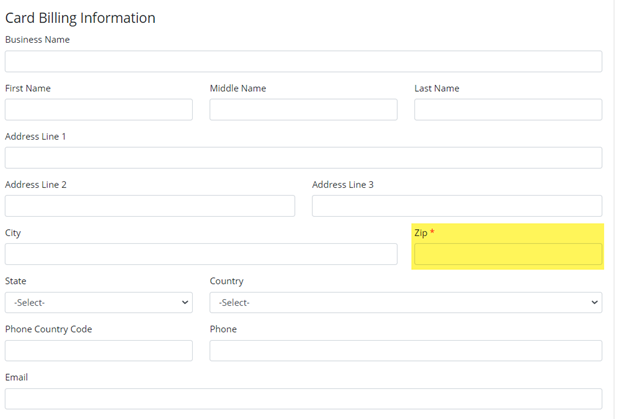
- The Zip Code is the only required field in these additional fields.
- Note that the Zip code field’s format may be changed if another country is selected in the Country field.
-
- Disable Duplicate Detection
4. Terminals Management
Manage terminal devices from within MerchantTrack.
⚠️ Caution:
This section should only be used:
With guidance from Technical Support
If you have prior experience with terminal activation or re-registration


5.
📈 MerchantTrack Reports
A wide range of reports are available to provide full visibility into transactions, deposits, chargebacks, and gift card activity.

📂 Funding & Transaction Reports
| Report | Description |
|---|---|
| Funding Summary Report | Shows each deposit batch with links to detailed transactions |
| Transaction Summary Report | Daily totals by payment type |
| Funding by Transaction Report | Lists each funded transaction by date |
| Funding by Line Item Report | Breaks down funding to individual sale line items |
⚠️ Chargeback Reports
| Report | Description |
|---|---|
| Chargeback Summary Report | Summarizes total chargebacks by date |
| Chargeback Report | Detailed view of each chargeback |
| Chargeback Action Report | Tracks actions taken on each chargeback |
🧾 Transaction Reporting
| Report | Description |
|---|---|
| Transactions Report | Lists all successful and failed transactions with error codes to identify why a card transaction failed. |
| Merchant Statement | Daily/monthly breakdown of transactions, deposits, fees, and chargebacks |
| Merchant Deposit Report | Monthly deposit details with breakdown of fees and chargebacks |
🎁 Gift Card Reporting
| Report | Description |
|---|---|
| Gift Card Operations Report | Lists all gift card attempts and outcomes |
| Gift Card Operation Summary Report | Summarizes gift card activity by day and payment type |
📝 Summary
| Feature | Purpose |
|---|---|
| Dashboard | Quick stats, visual charts, and recent activity |
| Transaction Search | Locate specific payments quickly |
| Virtual Terminal | Backup method for card entry (not linked to TUS) |
| Reports | Extensive financial and operational reporting |
| Terminals | Manage payment hardware (use with support guidance) |