1. Home
  2. Hardware
  3. Configure Serial Scanners
  1. Home
  2. Setup
  3. Configure Serial Scanners

Configure Serial Scanners

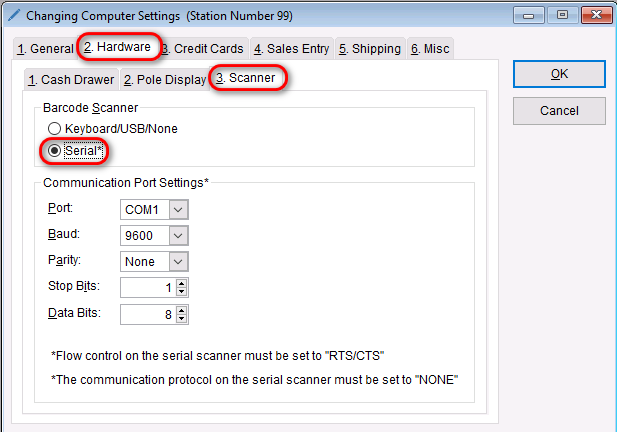
Serial scanners require a little more configuration, but are able to be used with the program. If you have a Serial scanner that needs to be configured to work with the program,

  • Go to: Setup > Computer
  • Select the Hardware tab > Scanner tab < Select Serial radio button
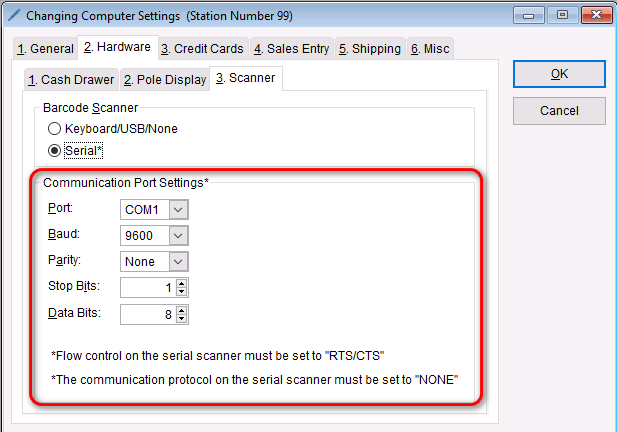
  • In the “Communication Port Settings” section, select the desired options

Note

Flow control on the serial scanner must be set to “RTS/CTS”. Consult the scanner user manual to configure this setting. The communication protocol on the serial scanner must be set to “NONE”.

    • Select OK to save the changes to the barcode scanner


Updated on February 12, 2026

Was this article helpful?

Related Articles