
📨 WebStore Configuration – Email
This article explains how to configure email-related settings for your WebStore in the POS system. The Email section allows administrators to manage email communication for account setup, order confirmations, password resets, and billing workflows.
To manage the WebStore email settings please navigate to your webstore configuration and select the email tab.
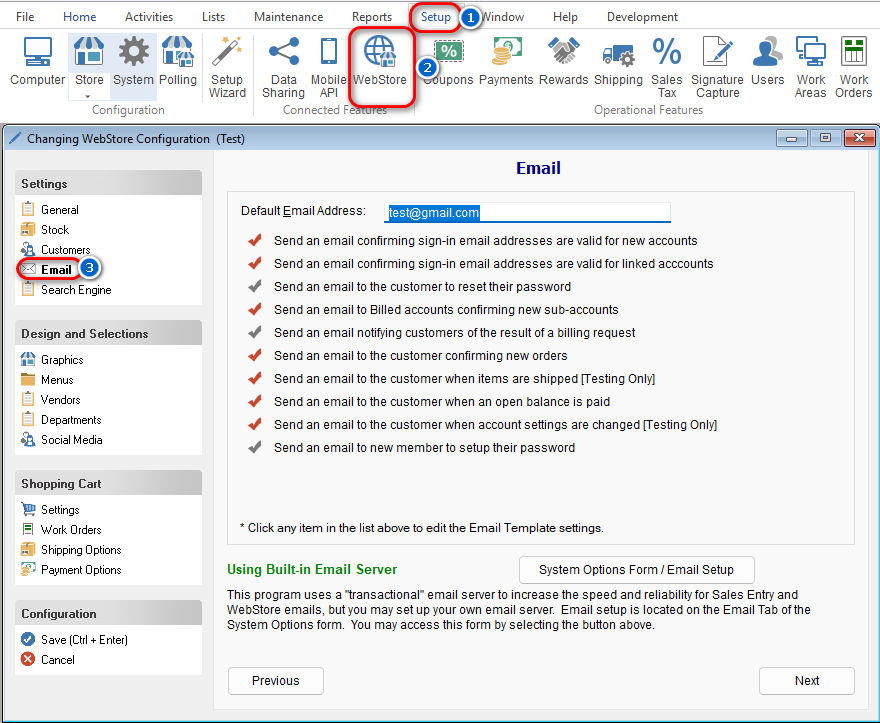
📧 Default Email Address
Default Email Address
This is the primary email address used by the WebStore to send all outgoing emails.
🔐 Email Verification Options
✅ Confirm Sign-In Email Addresses for New
Accounts
-
Purpose: Verifies the validity of email addresses when a customer creates a new WebStore account.
-
How It Works: The system sends a verification email with a link. Customers must click the link to complete profile setup.
✅ Confirm Sign-In Email Addresses for Linked Accounts
-
Purpose: Verifies email addresses for customers linking a new WebStore profile to an existing account.
-
How It Works: Sends a verification link to the provided email during the linking process.
🔑 Password Reset Emails
✅ Send Email to Reset Password
-
Purpose: Enables customers to reset their password automatically via email.
-
How It Works:
-
Customer initiates a password reset from the Sign-In Form.
-
A reset link is emailed (only if a valid email is entered).
-
Clicking the link logs the user in and allows password update.
-
-
Note: Passwords can also be reset manually via the WebStore Access tab on the Customer Form.
🧾 Billing Emails
✅ Confirm New Sub-Accounts for Billed Accounts
-
Purpose: Required to enable 3rd Party Billing for customer profiles.
How It Works:
-
When a customer requests to link to a Billed account, a notification email is sent to the admin on that account.
-
The Billed account can then approve the request via email.
-
✅ Notify Customer of Billing Request Status
-
Purpose: Keeps customers informed about the outcome of their 3rd Party Billing request.
-
How It Works: Sends an approval or denial email to the requesting customer from the admin of the on account.
📦 Order Confirmation Emails
✅ Confirm New Orders
-
Purpose: Notifies customers when a new WebStore order has been successfully placed.
-
How It Works: Sends an email confirmation for every completed order.
⚙️ Settings and Customization
🛠️ Settings Button
-
Found next to each feature listed above.
-
Opens the Email Entry Form, where you can view or customize the message sent.
📋 System Options Form / Email Setup
-
Use this to configure the email account that the POS system uses to send all WebStore emails. Navigate to: System Options Form > Email Tab
